Web based SSH.
Your servers,
from anywhere.
NebulaSSH is webssh done properly — a full SSH terminal, web SFTP client, browser VNC client, AI-ready browser viewer and a fleet of remote agents in one secure web app. Run SSH from browser with nothing to install.
Everything your infrastructure needs, in one tab.
Ten tightly-integrated tools, engineered to work together — an online SSH terminal, a web SFTP client and a browser VNC client side by side. No plugins, no desktop clients, no VPN gymnastics — just your browser and your machines.
Browser SSH Terminal
A complete terminal experience in the browser, built for daily production work.
- Multi-tab sessions with saved connections and import/export
- Password and private-key authentication
- Live host metrics — CPU, memory and uptime beside your shell
- Per-user preferences for font, scrollback and display lines
SFTP File Manager
The remote filesystem, handled like a local drive — without leaving the session.
- Drag & drop uploads, including whole folders
- Full file operations — download, rename, delete, chmod
- Inline editing of remote files
- Streamed transfers for large files
VNC Desktop
Full remote desktops in the browser with display auto-detection — no viewer application required.
AI Browser Viewing
A Playwright viewer and VNC API that let AI agents watch and drive real browsers on your machines.
Connector Agents
Reach machines behind NAT and firewalls — enroll once, then run commands from the dashboard.
Command Macros
Organise frequent commands into nested folders and run them in any session with one click.
Security First
BCrypt-hashed accounts, role-based access, one-time enrollment tokens and per-user API keys.
Admin & Analytics
Manage users and roles, and follow usage across sessions and tools from a dedicated admin area.
Agent File Transfer
Push and pull files through the built-in transfer server — even behind NAT, without an SSH daemon.
CLI & Integrations
A scriptable CLI plus an MCP server, so automation and AI assistants can operate your fleet safely.
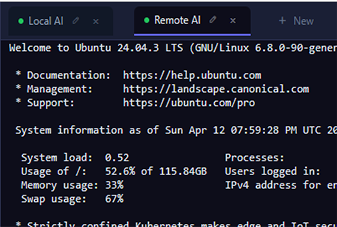
A real terminal, not a toy console.
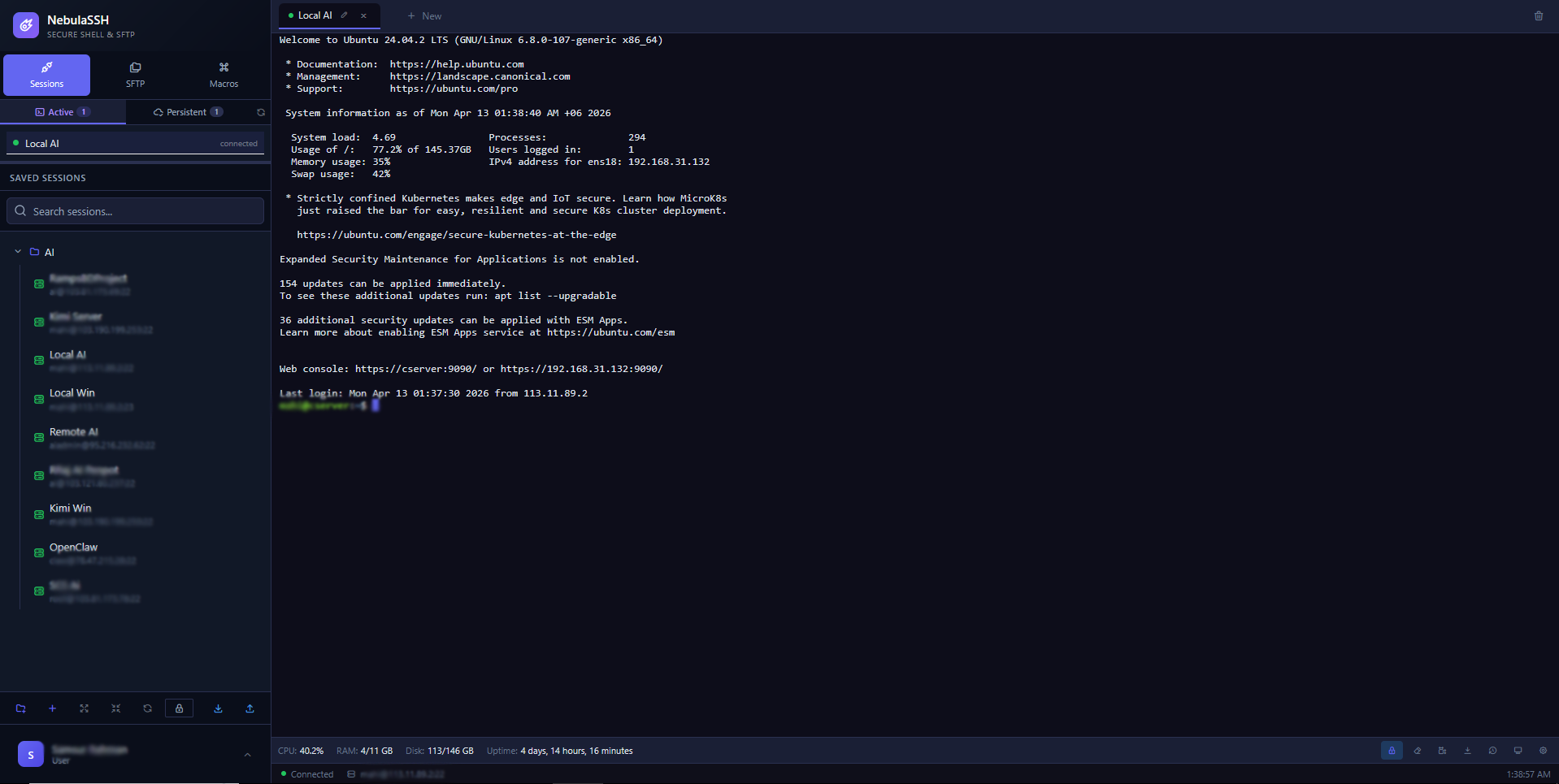
Saved sessions on the left, a live shell in the middle, host metrics along the bottom — the same layout whether you are on a laptop, a Chromebook or a tablet.
An agent for every machine you own.
Native builds, zero runtime fuss — Windows, Linux, and now the Android phone in your pocket. Download, paste an enrollment token, and the device appears in your dashboard — wherever it lives, behind whatever NAT.
NEBULASSH_ENROLL_TOKEN=…) and stays bound to your account until you release it.
Online in three steps.
Sign in
Open NebulaSSH in any modern browser. Your sessions, macros and settings follow your account — not your device.
Connect or enroll
SSH straight into reachable hosts, or drop an agent on machines behind NAT and claim them with a one-time enrollment token.
Operate everything
Terminal, files, desktops, browsers and automation — every tool shares your sessions and works from the same dashboard.
Simple plans that scale with your fleet.
Start free, upgrade when your infrastructure grows. No hidden fees, cancel anytime.
For trying NebulaSSH and personal use.
- Browser SSH terminal
- SFTP file manager
- Saved sessions & macros
- 1 connector agent
- Community support
For professionals and teams running real workloads.
- Everything in Free
- Unlimited sessions, macros & agents
- VNC desktop & AI browser viewing
- Agent file transfer & CLI access
- Priority support
For organisations with compliance and scale needs.
- Everything in Professional
- Self-hosted deployment
- SSO & advanced role control
- Audit logs & analytics
- Dedicated support & SLA
The things people ask first.
Do I need to install an SSH client?
No. NebulaSSH runs entirely in your browser, so any machine with Chrome, Edge, Firefox or Safari can open a full SSH terminal — including a Chromebook, an iPad or a locked-down work laptop.
Can NebulaSSH reach a server behind NAT or a firewall?
Yes. Install the Tunnel Connector agent on the machine and it dials out to NebulaSSH, so you get a shell without port forwarding, a static IP or a VPN.
Which operating systems do the connector agents support?
Windows x64, Windows ARM64 and Windows 7, Linux x64 and ARM64, and Android. Every agent enrols with a token, so there is no inbound port to open.
Can I transfer files as well as run commands?
Yes. The built-in SFTP file manager sits beside the terminal with drag-and-drop uploads, whole-folder transfers and in-place editing of remote files.
Does NebulaSSH support remote desktops as well as terminals?
Yes. VNC remote desktop is included from the Professional plan, so you can drive a graphical desktop in the same tab as your shell sessions.
How much does NebulaSSH cost?
There is a free tier for personal use and evaluation. Professional is $12 per user per month for teams running real workloads, and Enterprise is quoted per organisation for compliance and scale requirements.
The web based SSH replacement for your desktop toolbox.
If you are hunting for a PuTTY alternative, a Termius alternative, an Apache Guacamole alternative or something friendlier than ShellInABox, NebulaSSH covers all of it from one browser tab.
Instead of PuTTY
A real online SSH terminal with tabs, saved hosts, key auth and a scrollback you can search — on any machine, without carrying an executable around.
Instead of WinSCP
A web SFTP client attached to the same session. Browse, edit and move files without opening a second program or re-entering credentials.
Instead of a VNC viewer
A browser VNC client built on noVNC, so a graphical desktop opens in the same tab as your shell — no client download, no port juggling.
Instead of a VPN or jump box
Connector agents dial out, so you can reach a machine behind NAT without an SSH jump host, an open inbound port or a VPN client on every laptop.
Mission control for your machines.
Stop juggling PuTTY, WinSCP, VNC viewers and VPNs. NebulaSSH replaces the whole toolbox with one secure tab of web based SSH.
Get Started